846 lines
35 KiB
Markdown
846 lines
35 KiB
Markdown
# camera-controls
|
|
|
|
A camera control for three.js, similar to THREE.OrbitControls yet supports smooth transitions and more features.
|
|
|
|
[](https://www.npmjs.com/package/camera-controls) [](https://github.com/codespaces/new?template_repository=yomotsu%2Fcamera-controls)
|
|
|
|
[documentation](https://yomotsu.github.io/camera-controls/classes/CameraControls)
|
|
|
|
## Examples
|
|
|
|
| camera move | default user input (Configurable) |
|
|
| --- | --- |
|
|
| Orbit rotation | left mouse drag / touch: one-finger move |
|
|
| Dolly | middle mouse drag, or mousewheel / touch: two-finger pinch-in or out |
|
|
| Truck (Pan) | right mouse drag / touch: two-finger move or three-finger move |
|
|
|
|
- [basic](https://yomotsu.github.io/camera-controls/examples/basic.html)
|
|
- [fit-and-padding](https://yomotsu.github.io/camera-controls/examples/fit-and-padding.html)
|
|
- [fit-to-rect](https://yomotsu.github.io/camera-controls/examples/fit-to-rect.html)
|
|
- [fit-to-bounding-sphere](https://yomotsu.github.io/camera-controls/examples/fit-to-bounding-sphere.html)
|
|
- [infinity dolly](https://yomotsu.github.io/camera-controls/examples/infinity-dolly.html)
|
|
- [boundary](https://yomotsu.github.io/camera-controls/examples/boundary.html)
|
|
- [focal offset](https://yomotsu.github.io/camera-controls/examples/focal-offset.html)
|
|
- [click to set orbit point](https://yomotsu.github.io/camera-controls/examples/click-to-set-orbit-point.html)
|
|
- [look in the point direction](https://yomotsu.github.io/camera-controls/examples/look-in-direction.html)
|
|
- [viewport within the canvas](https://yomotsu.github.io/camera-controls/examples/viewport.html)
|
|
- [multiple camera-controls and viewport](https://yomotsu.github.io/camera-controls/examples/multiple.html)
|
|
- [z-up camera](https://yomotsu.github.io/camera-controls/examples/camera-up.html)
|
|
- [orthographic](https://yomotsu.github.io/camera-controls/examples/orthographic.html)
|
|
- [event attach / detach](https://yomotsu.github.io/camera-controls/examples/event-attach.html)
|
|
- [user input config](https://yomotsu.github.io/camera-controls/examples/config.html)
|
|
- [mouse drag with modifier keys](https://yomotsu.github.io/camera-controls/examples/mouse-drag-with-modifier-keys.html)
|
|
- [combined gestures](https://yomotsu.github.io/camera-controls/examples/combined-gestures.html)
|
|
- [keyboard events](https://yomotsu.github.io/camera-controls/examples/keyboard.html)
|
|
- [rest and sleep events](https://yomotsu.github.io/camera-controls/examples/rest-and-sleep.html)
|
|
- [changing the cursor](https://yomotsu.github.io/camera-controls/examples/cursor.html)
|
|
- [collision](https://yomotsu.github.io/camera-controls/examples/collision.html)
|
|
- [collision (custom)](https://yomotsu.github.io/camera-controls/examples/collision-custom.html)
|
|
- [first-person](https://yomotsu.github.io/camera-controls/examples/first-person.html)
|
|
- [third-person](https://yomotsu.github.io/meshwalk/examples/5_terrain.html) (with [meshwalk](https://github.com/yomotsu/meshwalk))
|
|
- [pointer lock](https://yomotsu.github.io/camera-controls/examples/pointer-lock.html)
|
|
- [auto rotate](https://yomotsu.github.io/camera-controls/examples/auto-rotate.html)
|
|
- [view offset translate](https://yomotsu.github.io/camera-controls/examples/view-offset.html)
|
|
- [camera shake effect](https://yomotsu.github.io/camera-controls/examples/effect-shake.html)
|
|
- [rotate with time duration and easing](https://yomotsu.github.io/camera-controls/examples/easing.html) (with [gsap](https://www.npmjs.com/package/gsap))
|
|
- [path animation](https://yomotsu.github.io/camera-controls/examples/path-animation.html) (with [gsap](https://www.npmjs.com/package/gsap))
|
|
- [complex transitions with `await`](https://yomotsu.github.io/camera-controls/examples/await-transitions.html)
|
|
- [set view padding](https://yomotsu.github.io/camera-controls/examples/padding-with-view-offset.html)
|
|
- [WebWorker (OffscreenCanvas)](https://yomotsu.github.io/camera-controls/examples/worker.html)
|
|
- [outside of iframe dragging](https://yomotsu.github.io/camera-controls/examples/iframe.html)
|
|
- [in react-three-fiber (simplest)](https://codesandbox.io/s/react-three-fiber-camera-controls-4jjor?file=/src/App.tsx)
|
|
- [in react-three-fiber (drei official)](https://codesandbox.io/s/sew669) (see [doc](https://github.com/pmndrs/drei#cameracontrols))
|
|
|
|
## Usage
|
|
|
|
(The below code is for three.js users. If you use react-three-fiber (aka R3F), r3f-ready camera-controls is available on [@react-three/drei](https://github.com/pmndrs/drei#cameracontrols)
|
|
|
|
```javascript
|
|
import * as THREE from 'three';
|
|
import CameraControls from 'camera-controls';
|
|
|
|
CameraControls.install( { THREE: THREE } );
|
|
|
|
// snip ( init three scene... )
|
|
const clock = new THREE.Clock();
|
|
const camera = new THREE.PerspectiveCamera( 60, width / height, 0.01, 1000 );
|
|
const cameraControls = new CameraControls( camera, renderer.domElement );
|
|
|
|
( function anim () {
|
|
|
|
// snip
|
|
const delta = clock.getDelta();
|
|
const hasControlsUpdated = cameraControls.update( delta );
|
|
|
|
requestAnimationFrame( anim );
|
|
|
|
// you can skip this condition to render though
|
|
if ( hasControlsUpdated ) {
|
|
|
|
renderer.render( scene, camera );
|
|
|
|
}
|
|
|
|
} )();
|
|
```
|
|
|
|
### Important!
|
|
|
|
You *must install* three.js before using camera-controls. Not doing so will lead to runtime errors (undefined references to THREE).
|
|
|
|
**Before creating a new CameraControls instance, call**:
|
|
```javascript
|
|
CameraControls.install( { THREE: THREE } );
|
|
```
|
|
|
|
You can then proceed to use CameraControls.
|
|
|
|
Note: If you do not wish to use the entire three.js to reduce file size(tree-shaking for example), make a subset to install.
|
|
|
|
```js
|
|
import {
|
|
Vector2,
|
|
Vector3,
|
|
Vector4,
|
|
Quaternion,
|
|
Matrix4,
|
|
Spherical,
|
|
Box3,
|
|
Sphere,
|
|
Raycaster,
|
|
} from 'three';
|
|
|
|
const subsetOfTHREE = {
|
|
Vector2 : Vector2,
|
|
Vector3 : Vector3,
|
|
Vector4 : Vector4,
|
|
Quaternion: Quaternion,
|
|
Matrix4 : Matrix4,
|
|
Spherical : Spherical,
|
|
Box3 : Box3,
|
|
Sphere : Sphere,
|
|
Raycaster : Raycaster,
|
|
};
|
|
|
|
CameraControls.install( { THREE: subsetOfTHREE } );
|
|
```
|
|
|
|
## Constructor
|
|
|
|
`CameraControls( camera, domElement )`
|
|
|
|
- `camera` is a `THREE.PerspectiveCamera` or `THREE.OrthographicCamera` to be controlled.
|
|
- `domElement` is a `HTMLElement` for draggable area. (optional. if domElement is omitted here, can be connect later with `.connect()`)
|
|
|
|
## Terms
|
|
|
|
### Orbit rotations
|
|
|
|
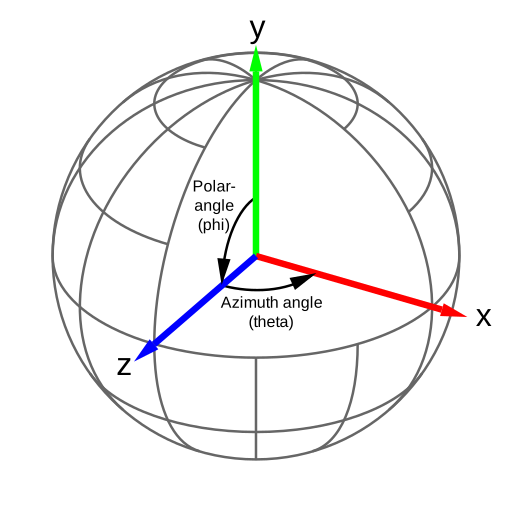
CameraControls uses Spherical Coordinates for orbit rotations.
|
|
|
|
If your camera is Y-up, the Azimuthal angle will be the angle for y-axis rotation and the Polar angle will be the angle for vertical position.
|
|
|
|
|
|
|
|
|
|
### Dolly vs Zoom
|
|
|
|
- A Zoom involves changing the lens focal length. In three.js, zooming is actually changing the camera FOV, and the camera is stationary (doesn't move).
|
|
- A Dolly involves physically moving the camera to change the composition of the image in the frame.
|
|
|
|
See [the demo](https://github.com/yomotsu/camera-movement-comparison#dolly-vs-zoom)
|
|
|
|
## Properties
|
|
|
|
| Name | Type | Default | Description |
|
|
| ------------------------- | --------- | ----------- | ----------- |
|
|
| `.camera` | `THREE.Perspective \| THREE.Orthographic` | N/A | The camera to be controlled |
|
|
| `.enabled` | `boolean` | `true` | Whether or not the controls are enabled. |
|
|
| `.active` | `boolean` | `false` | Returns `true` if the controls are active updating. |
|
|
| `.currentAction` | `ACTION` | N/A | Getter for the current `ACTION`. |
|
|
| `.distance` | `number` | N/A | Current distance. |
|
|
| `.minDistance` | `number` | `Number.EPSILON` | Minimum distance for dolly. The value must be higher than `0` |
|
|
| `.maxDistance` | `number` | `Infinity` | Maximum distance for dolly. |
|
|
| `.minZoom` | `number` | `0.01` | Minimum camera zoom. |
|
|
| `.maxZoom` | `number` | `Infinity` | Maximum camera zoom. |
|
|
| `.polarAngle` | `number` | N/A | Current polarAngle in radians. |
|
|
| `.minPolarAngle` | `number` | `0` | In radians. |
|
|
| `.maxPolarAngle` | `number` | `Math.PI` | In radians. |
|
|
| `.azimuthAngle` | `number` | N/A | current azimuthAngle in radians ¹. |
|
|
| `.minAzimuthAngle` | `number` | `-Infinity` | In radians. |
|
|
| `.maxAzimuthAngle` | `number` | `Infinity` | In radians. |
|
|
| `.boundaryFriction` | `number` | `0.0` | Friction ratio of the boundary. |
|
|
| `.boundaryEnclosesCamera` | `boolean` | `false` | Whether camera position should be enclosed in the boundary or not. |
|
|
| `.smoothTime` | `number` | `0.25` | Approximate time in seconds to reach the target. A smaller value will reach the target faster. |
|
|
| `.draggingSmoothTime` | `number` | `0.125` | The smoothTime while dragging. |
|
|
| `.azimuthRotateSpeed` | `number` | `1.0` | Speed of azimuth rotation. |
|
|
| `.polarRotateSpeed` | `number` | `1.0` | Speed of polar rotation. |
|
|
| `.dollySpeed` | `number` | `1.0` | Speed of mouse-wheel dollying. |
|
|
| `.truckSpeed` | `number` | `2.0` | Speed of drag for truck and pedestal. |
|
|
| `.dollyToCursor` | `boolean` | `false` | `true` to enable Dolly-in to the mouse cursor coords. |
|
|
| `.dollyDragInverted` | `boolean` | `false` | `true` to invert direction when dollying or zooming via drag. |
|
|
| `.interactiveArea` | `DOMRect` | N/A | Set drag-start, touches and wheel enable area in the domElement. each values are between `0` and `1` inclusive, where `0` is left/top and `1` is right/bottom of the screen. |
|
|
| `.colliderMeshes` | `array` | `[]` | An array of Meshes to collide with camera ². |
|
|
| `.infinityDolly` | `boolean` | `false` | `true` to enable Infinity Dolly for wheel and pinch. Use this with `minDistance` and `maxDistance` ³. |
|
|
| `.restThreshold` | `number` | `0.0025` | Controls how soon the `rest` event fires as the camera slows |
|
|
|
|
1. Every 360 degrees turn is added to `.azimuthAngle` value, which is accumulative.
|
|
`360º = 360 * THREE.MathUtils.DEG2RAD = Math.PI * 2`, `720º = Math.PI * 4`.
|
|
**Tip**: [How to normalize accumulated azimuthAngle?](#tips)
|
|
2. Be aware colliderMeshes may decrease performance. The collision test uses 4 raycasters from the camera since the near plane has 4 corners.
|
|
3. If the Dolly distance is less (or over) than the `minDistance` (or `maxDistance`), `infinityDolly` will keep the distance and pushes the target position instead.
|
|
|
|
## Events
|
|
|
|
CameraControls instance emits the following events.
|
|
To subscribe, use `cameraControl.addEventListener( 'eventname', function )`.
|
|
To unsubscribe, use `cameraControl.removeEventListener( 'eventname', function )`.
|
|
|
|
| Event name | Timing |
|
|
| ------------------- | ------ |
|
|
| `'controlstart'` | When the user starts to control the camera via mouse / touches. ¹ |
|
|
| `'control'` | When the user controls the camera (dragging). |
|
|
| `'controlend'` | When the user ends to control the camera. ¹ |
|
|
| `'transitionstart'` | When any kind of transition starts, either user control or using a method with `enableTransition = true` |
|
|
| `'update'` | When the camera position is updated. |
|
|
| `'wake'` | When the camera starts moving. |
|
|
| `'rest'` | When the camera movement is below `.restThreshold` ². |
|
|
| `'sleep'` | When the camera end moving. |
|
|
|
|
1. `mouseButtons.wheel` (Mouse wheel control) does not emit `'controlstart'` and `'controlend'`. `mouseButtons.wheel` uses scroll-event internally, and scroll-event happens intermittently. That means "start" and "end" cannot be detected.
|
|
2. Due to damping, `sleep` will usually fire a few seconds after the camera _appears_ to have stopped moving. If you want to do something (e.g. enable UI, perform another transition) at the point when the camera has stopped, you probably want the `rest` event. This can be fine tuned using the `.restThreshold` parameter. See the [Rest and Sleep Example](https://yomotsu.github.io/camera-controls/examples/rest-and-sleep.html).
|
|
|
|
## User input config
|
|
|
|
Working example: [user input config](https://yomotsu.github.io/camera-controls/examples/config.html)
|
|
|
|
| button to assign | behavior |
|
|
| --------------------- | -------- |
|
|
| `mouseButtons.left` | `CameraControls.ACTION.ROTATE`* \| `CameraControls.ACTION.TRUCK` \| `CameraControls.ACTION.SCREEN_PAN` \| `CameraControls.ACTION.OFFSET` \| `CameraControls.ACTION.DOLLY` \| `CameraControls.ACTION.ZOOM` \| `CameraControls.ACTION.NONE` |
|
|
| `mouseButtons.right` | `CameraControls.ACTION.ROTATE` \| `CameraControls.ACTION.TRUCK`* \| `CameraControls.ACTION.SCREEN_PAN` \| `CameraControls.ACTION.OFFSET` \| `CameraControls.ACTION.DOLLY` \| `CameraControls.ACTION.ZOOM` \| `CameraControls.ACTION.NONE` |
|
|
| `mouseButtons.wheel` ¹ | `CameraControls.ACTION.ROTATE` \| `CameraControls.ACTION.TRUCK` \| `CameraControls.ACTION.SCREEN_PAN` \| `CameraControls.ACTION.OFFSET` \| `CameraControls.ACTION.DOLLY` \| `CameraControls.ACTION.ZOOM` \| `CameraControls.ACTION.NONE` |
|
|
| `mouseButtons.middle` ² | `CameraControls.ACTION.ROTATE` \| `CameraControls.ACTION.TRUCK` \| `CameraControls.ACTION.SCREEN_PAN` \| `CameraControls.ACTION.OFFSET` \| `CameraControls.ACTION.DOLLY`* \| `CameraControls.ACTION.ZOOM` \| `CameraControls.ACTION.NONE` |
|
|
|
|
1. Mouse wheel event for scroll "up/down" on mac "up/down/left/right"
|
|
2. Mouse click on wheel event "button"
|
|
|
|
- \* is the default.
|
|
- The default of `mouseButtons.wheel` is:
|
|
- `DOLLY` for Perspective camera.
|
|
- `ZOOM` for Orthographic camera, and can't set `DOLLY`.
|
|
|
|
| fingers to assign | behavior |
|
|
| --------------------- | -------- |
|
|
| `touches.one` | `CameraControls.ACTION.TOUCH_ROTATE`* \| `CameraControls.ACTION.TOUCH_TRUCK` \| `CameraControls.ACTION.TOUCH_SCREEN_PAN` \| `CameraControls.ACTION.TOUCH_OFFSET` \| `CameraControls.ACTION.DOLLY` | `CameraControls.ACTION.ZOOM` | `CameraControls.ACTION.NONE` |
|
|
| `touches.two` | `ACTION.TOUCH_DOLLY_TRUCK` \| `ACTION.TOUCH_DOLLY_SCREEN_PAN` \| `ACTION.TOUCH_DOLLY_OFFSET` \| `ACTION.TOUCH_DOLLY_ROTATE` \| `ACTION.TOUCH_ZOOM_TRUCK` \| `ACTION.TOUCH_ZOOM_SCREEN_PAN` \| `ACTION.TOUCH_ZOOM_OFFSET` \| `ACTION.TOUCH_ZOOM_ROTATE` \| `ACTION.TOUCH_DOLLY` \| `ACTION.TOUCH_ZOOM` \| `CameraControls.ACTION.TOUCH_ROTATE` \| `CameraControls.ACTION.TOUCH_TRUCK` \| `CameraControls.ACTION.TOUCH_SCREEN_PAN` \| `CameraControls.ACTION.TOUCH_OFFSET` \| `CameraControls.ACTION.NONE` |
|
|
| `touches.three` | `ACTION.TOUCH_DOLLY_TRUCK` \| `ACTION.TOUCH_DOLLY_SCREEN_PAN` \| `ACTION.TOUCH_DOLLY_OFFSET` \| `ACTION.TOUCH_DOLLY_ROTATE` \| `ACTION.TOUCH_ZOOM_TRUCK` \| `ACTION.TOUCH_ZOOM_SCREEN_PAN` \| `ACTION.TOUCH_ZOOM_OFFSET` \| `ACTION.TOUCH_ZOOM_ROTATE` \| `CameraControls.ACTION.TOUCH_ROTATE` \| `CameraControls.ACTION.TOUCH_TRUCK` \| `CameraControls.ACTION.TOUCH_SCREEN_PAN` \| `CameraControls.ACTION.TOUCH_OFFSET` \| `CameraControls.ACTION.NONE` |
|
|
|
|
- \* is the default.
|
|
- The default of `touches.two` and `touches.three` is:
|
|
- `TOUCH_DOLLY_TRUCK` for Perspective camera.
|
|
- `TOUCH_ZOOM_TRUCK` for Orthographic camera, and can't set `TOUCH_DOLLY_TRUCK` and `TOUCH_DOLLY`.
|
|
|
|
## Methods
|
|
|
|
#### `rotate( azimuthAngle, polarAngle, enableTransition )`
|
|
|
|
Rotate azimuthal angle(horizontal) and polar angle(vertical).
|
|
Every value is added to the current value.
|
|
|
|
| Name | Type | Description |
|
|
| ------------------ | --------- | ----------- |
|
|
| `azimuthAngle` | `number` | Azimuth rotate angle. In radian. |
|
|
| `polarAngle` | `number` | Polar rotate angle. In radian. |
|
|
| `enableTransition` | `boolean` | Whether to move smoothly or immediately |
|
|
|
|
If you want to rotate only one axis, put a angle for the axis to rotate, and `0` for another.
|
|
``` js
|
|
rotate( 20 * THREE.MathUtils.DEG2RAD, 0, true );
|
|
```
|
|
|
|
---
|
|
|
|
#### `rotateAzimuthTo( azimuthAngle, enableTransition )`
|
|
|
|
Rotate azimuthal angle(horizontal) to the given angle and keep the same polar angle(vertical) target.
|
|
|
|
| Name | Type | Description |
|
|
| ------------------ | --------- | ----------- |
|
|
| `azimuthAngle` | `number` | Azimuth rotate angle. In radian. |
|
|
| `enableTransition` | `boolean` | Whether to move smoothly or immediately |
|
|
|
|
---
|
|
|
|
#### `rotatePolarTo( polarAngle, enableTransition )`
|
|
|
|
Rotate polar angle(vertical) to the given angle and keep the same azimuthal angle(horizontal) target.
|
|
|
|
| Name | Type | Description |
|
|
| ------------------ | --------- | ----------- |
|
|
| `polarAngle` | `number` | Polar rotate angle. In radian. |
|
|
| `enableTransition` | `boolean` | Whether to move smoothly or immediately |
|
|
|
|
---
|
|
|
|
#### `rotateTo( azimuthAngle, polarAngle, enableTransition )`
|
|
|
|
Rotate azimuthal angle(horizontal) and polar angle(vertical) to the given angle.
|
|
Camera view will rotate over the orbit pivot absolutely:
|
|
|
|
Azimuth angle
|
|
```
|
|
0º
|
|
\
|
|
90º -----+----- -90º
|
|
\
|
|
180º
|
|
```
|
|
0º front, 90º (`Math.PI / 2`) left, -90º (`- Math.PI / 2`) right, 180º (`Math.PI`) back
|
|
|
|
-----
|
|
|
|
Polar angle
|
|
```
|
|
180º
|
|
|
|
|
90º
|
|
|
|
|
0º
|
|
```
|
|
|
|
180º (`Math.PI`) top/sky, 90º (`Math.PI / 2`) horizontal from view, 0º bottom/floor
|
|
|
|
| Name | Type | Description |
|
|
| ------------------ | --------- | ----------- |
|
|
| `azimuthAngle` | `number` | Azimuth rotate angle to. In radian. |
|
|
| `polarAngle` | `number` | Polar rotate angle to. In radian. |
|
|
| `enableTransition` | `boolean` | Whether to move smoothly or immediately |
|
|
|
|
---
|
|
|
|
#### `dolly( distance, enableTransition )`
|
|
|
|
Dolly in/out camera position.
|
|
|
|
| Name | Type | Description |
|
|
| ------------------ | --------- | ----------- |
|
|
| `distance` | `number` | Distance of dollyIn |
|
|
| `enableTransition` | `boolean` | Whether to move smoothly or immediately |
|
|
|
|
---
|
|
|
|
#### `dollyTo( distance, enableTransition )`
|
|
|
|
Dolly in/out camera position to given distance.
|
|
|
|
| Name | Type | Description |
|
|
| ------------------ | --------- | ----------- |
|
|
| `distance` | `number` | Distance of dollyIn |
|
|
| `enableTransition` | `boolean` | Whether to move smoothly or immediately |
|
|
|
|
---
|
|
|
|
#### `dollyInFixed( distance, enableTransition )`
|
|
|
|
Dolly in, but does not change the distance between the target and the camera, and moves the target position instead.
|
|
Specify a negative value for dolly out.
|
|
|
|
| Name | Type | Description |
|
|
| ------------------ | --------- | ----------- |
|
|
| `distance` | `number` | Distance of dollyIn |
|
|
| `enableTransition` | `boolean` | Whether to move smoothly or immediately |
|
|
|
|
---
|
|
|
|
#### `zoom( zoomStep, enableTransition )`
|
|
|
|
Zoom in/out camera. The value is added to camera zoom.
|
|
Limits set with `.minZoom` and `.maxZoom`
|
|
|
|
| Name | Type | Description |
|
|
| ------------------ | --------- | ----------- |
|
|
| `zoomStep` | `number` | zoom scale |
|
|
| `enableTransition` | `boolean` | Whether to move smoothly or immediately |
|
|
|
|
You can also make zoomIn function using `camera.zoom` property.
|
|
e.g.
|
|
``` js
|
|
const zoomIn = () => cameraControls.zoom( camera.zoom / 2, true );
|
|
const zoomOut = () => cameraControls.zoom( - camera.zoom / 2, true );
|
|
```
|
|
|
|
---
|
|
|
|
#### `zoomTo( zoom, enableTransition )`
|
|
|
|
Zoom in/out camera to given scale. The value overwrites camera zoom.
|
|
Limits set with `.minZoom` and `.maxZoom`
|
|
|
|
| Name | Type | Description |
|
|
| ------------------ | --------- | ----------- |
|
|
| `zoom` | `number` | zoom scale |
|
|
| `enableTransition` | `boolean` | Whether to move smoothly or immediately |
|
|
|
|
|
|
---
|
|
|
|
#### `truck( x, y, enableTransition )`
|
|
|
|
Truck and pedestal camera using current azimuthal angle.
|
|
|
|
| Name | Type | Description |
|
|
| ------------------ | --------- | ----------- |
|
|
| `x` | `number` | Horizontal translate amount |
|
|
| `y` | `number` | Vertical translate amount |
|
|
| `enableTransition` | `boolean` | Whether to move smoothly or immediately |
|
|
|
|
---
|
|
|
|
#### `lookInDirectionOf( x, y, z, enableTransition )`
|
|
|
|
Look in the given point direction.
|
|
|
|
| Name | Type | Description |
|
|
| ------------------ | --------- | ----------- |
|
|
| `x` | `number` | point x |
|
|
| `y` | `number` | point y |
|
|
| `z` | `number` | point z |
|
|
| `enableTransition` | `boolean` | Whether to move smoothly or immediately |
|
|
|
|
#### `setFocalOffset( x, y, z, enableTransition )`
|
|
|
|
Set focal offset using the screen parallel coordinates.
|
|
`z` doesn't affect in Orthographic as with Dolly.
|
|
|
|
| Name | Type | Description |
|
|
| ------------------ | --------- | ----------- |
|
|
| `x` | `number` | Horizontal offset amount |
|
|
| `y` | `number` | Vertical offset amount |
|
|
| `z` | `number` | Depth offset amount. The result is the same as Dolly but unaffected by `minDistance` and `maxDistance` |
|
|
| `enableTransition` | `boolean` | Whether to move smoothly or immediately |
|
|
|
|
---
|
|
|
|
#### `setOrbitPoint( targetX, targetY, targetZ )`
|
|
|
|
Set orbit point without moving the camera.
|
|
|
|
| Name | Type | Description |
|
|
| ------------------ | --------- | ----------- |
|
|
| `targetX` | `number` | Orbit center position x |
|
|
| `targetY` | `number` | Orbit center position y |
|
|
| `targetZ` | `number` | Orbit center position z |
|
|
|
|
---
|
|
|
|
#### `forward( distance, enableTransition )`
|
|
|
|
Move forward / backward.
|
|
|
|
| Name | Type | Description |
|
|
| ------------------ | --------- | ----------- |
|
|
| `distance` | `number` | Amount to move forward / backward. Negative value to move backward |
|
|
| `enableTransition` | `boolean` | Whether to move smoothly or immediately |
|
|
|
|
---
|
|
|
|
#### `moveTo( x, y, z, enableTransition )`
|
|
|
|
Move `target` position to given point.
|
|
|
|
| Name | Type | Description |
|
|
| ------------------ | --------- | ----------- |
|
|
| `x` | `number` | x coord to move center position |
|
|
| `y` | `number` | y coord to move center position |
|
|
| `z` | `number` | z coord to move center position |
|
|
| `enableTransition` | `boolean` | Whether to move smoothly or immediately |
|
|
|
|
---
|
|
|
|
#### `elevate( height, enableTransition )`
|
|
|
|
Move up / down.
|
|
|
|
| Name | Type | Description |
|
|
| ------------------ | --------- | ----------- |
|
|
| `height` | `number` | Amount to move up / down. Negative value to move down |
|
|
| `enableTransition` | `boolean` | Whether to move smoothly or immediately |
|
|
|
|
---
|
|
|
|
#### `fitToBox( box3OrMesh, enableTransition, { paddingTop, paddingLeft, paddingBottom, paddingRight } )`
|
|
|
|
Fit the viewport to the box or the bounding box of the object, using the nearest axis. paddings are in unit.
|
|
set `cover: true` to fill enter screen.
|
|
|
|
| Name | Type | Description |
|
|
| ----------------------- | ---------------------------- | ----------- |
|
|
| `box3OrMesh` | `THREE.Box3` \| `THREE.Mesh` | Axis aligned bounding box to fit the view. |
|
|
| `enableTransition` | `boolean` | Whether to move smoothly or immediately |
|
|
| `options` | `object` | Options |
|
|
| `options.cover` | `boolean` | Whether fill enter screen or not. Default is `false` |
|
|
| `options.paddingTop` | `number` | Padding top. Default is `0` |
|
|
| `options.paddingRight` | `number` | Padding right. Default is `0` |
|
|
| `options.paddingBottom` | `number` | Padding bottom. Default is `0` |
|
|
| `options.paddingLeft` | `number` | Padding left. Default is `0` |
|
|
|
|
---
|
|
|
|
#### `fitToSphere( sphereOrMesh, enableTransition )`
|
|
|
|
Fit the viewport to the sphere or the bounding sphere of the object.
|
|
|
|
| Name | Type | Description |
|
|
| ------------------ | ------------------------------ | ----------- |
|
|
| `sphereOrMesh` | `THREE.Sphere` \| `THREE.Mesh` | bounding sphere to fit the view. |
|
|
| `enableTransition` | `boolean` | Whether to move smoothly or immediately |
|
|
|
|
---
|
|
|
|
#### `setLookAt( positionX, positionY, positionZ, targetX, targetY, targetZ, enableTransition )`
|
|
|
|
Look at the `target` from the `position`.
|
|
|
|
| Name | Type | Description |
|
|
| ------------------ | --------- | ----------- |
|
|
| `positionX` | `number` | Camera position x. |
|
|
| `positionY` | `number` | Camera position y. |
|
|
| `positionZ` | `number` | Camera position z. |
|
|
| `targetX` | `number` | Orbit center position x. |
|
|
| `targetY` | `number` | Orbit center position y. |
|
|
| `targetZ` | `number` | Orbit center position z. |
|
|
| `enableTransition` | `boolean` | Whether to move smoothly or immediately |
|
|
|
|
---
|
|
|
|
#### `lerpLookAt( positionAX, positionAY, positionAZ, targetAX, targetAY, targetAZ, positionBX, positionBY, positionBZ, targetBX, targetBY, targetBZ, t, enableTransition )`
|
|
|
|
Similar to `setLookAt`, but it interpolates between two states.
|
|
|
|
| Name | Type | Description |
|
|
| ------------------ | --------- | ----------- |
|
|
| `positionAX` | `number` | The starting position x of look at from. |
|
|
| `positionAY` | `number` | The starting position y of look at from. |
|
|
| `positionAZ` | `number` | The starting position z of look at from. |
|
|
| `targetAX` | `number` | The starting position x of look at. |
|
|
| `targetAY` | `number` | The starting position y of look at. |
|
|
| `targetAZ` | `number` | The starting position z of look at. |
|
|
| `positionBX` | `number` | Look at from position x to interpolate towards. |
|
|
| `positionBY` | `number` | Look at from position y to interpolate towards. |
|
|
| `positionBZ` | `number` | Look at from position z to interpolate towards. |
|
|
| `targetBX` | `number` | look at position x to interpolate towards. |
|
|
| `targetBY` | `number` | look at position y to interpolate towards. |
|
|
| `targetBZ` | `number` | look at position z to interpolate towards. |
|
|
| `t` | `number` | Interpolation factor in the closed interval. The value must be a number between `0` to `1` inclusive, where `1` is 100% |
|
|
| `enableTransition` | `boolean` | Whether to move smoothly or immediately |
|
|
|
|
---
|
|
|
|
#### `setPosition( positionX, positionY, positionZ, enableTransition )`
|
|
|
|
Set angle and distance by given position.
|
|
An alias of `setLookAt()`, without target change. Thus keep gazing at the current target
|
|
|
|
| Name | Type | Description |
|
|
| ------------------ | --------- | ----------- |
|
|
| `positionX` | `number` | Position x of look at from. |
|
|
| `positionY` | `number` | Position y of look at from. |
|
|
| `positionZ` | `number` | Position z of look at from. |
|
|
| `enableTransition` | `boolean` | Whether to move smoothly or immediately |
|
|
|
|
---
|
|
|
|
#### `setTarget( targetX, targetY, targetZ, enableTransition )`
|
|
|
|
Set the target position where gaze at.
|
|
An alias of `setLookAt()`, without position change. Thus keep the same position.
|
|
|
|
| Name | Type | Description |
|
|
| ------------------ | --------- | ----------- |
|
|
| `targetX` | `number` | Position x of look at. |
|
|
| `targetY` | `number` | Position y of look at. |
|
|
| `targetZ` | `number` | Position z of look at. |
|
|
| `enableTransition` | `boolean` | Whether to move smoothly or immediately |
|
|
|
|
---
|
|
|
|
#### `setBoundary( box3? )`
|
|
|
|
Set the boundary box that encloses the target of the camera. `box3` is in `THREE.Box3`
|
|
|
|
| Name | Type | Description |
|
|
| ------ | ------------- | ----------- |
|
|
| `box3` | `THREE.Box3?` | Boundary area. No argument to remove the boundary. |
|
|
|
|
---
|
|
|
|
#### `setViewport( vector4? )`
|
|
|
|
Set (or unset) the current viewport.
|
|
Set this when you want to use renderer viewport and [`.dollyToCursor`](#properties) feature at the same time.
|
|
|
|
See: [THREE.WebGLRenderer.setViewport()](https://threejs.org/docs/#api/en/renderers/WebGLRenderer.setViewport)
|
|
|
|
| Name | Type | Description |
|
|
| --------- | ---------------- | ----------- |
|
|
| `vector4` | `THREE.Vector4?` | Vector4 that represents the viewport, or `undefined` for unsetting this. |
|
|
|
|
#### `setViewport( x, y, width, height )`
|
|
|
|
Same as [`setViewport( vector4 )`](#setviewport-vector4-|-null-), but you can give it four numbers that represents a viewport instead:
|
|
|
|
| Name | Type | Description |
|
|
| -------- | -------- | ----------- |
|
|
| `x` | `number` | Leftmost of the viewport. |
|
|
| `y` | `number` | Bottommost of the viewport. |
|
|
| `width` | `number` | Width of the viewport. |
|
|
| `height` | `number` | Height of the viewport. |
|
|
|
|
---
|
|
|
|
#### `getTarget( out, receiveEndValue )`
|
|
|
|
Returns the orbit center position, where the camera looking at.
|
|
|
|
| Name | Type | Description |
|
|
| ----------------- | --------------- | ----------- |
|
|
| `out` | `THREE.Vector3` | The receiving Vector3 instance to copy the result |
|
|
| `receiveEndValue` | `boolean` | Whether receive the transition end coords or current. default is `true` |
|
|
|
|
---
|
|
|
|
#### `getPosition( out, receiveEndValue )`
|
|
|
|
Returns the camera position.
|
|
|
|
| Name | Type | Description |
|
|
| ----------------- | --------------- | ----------- |
|
|
| `out` | `THREE.Vector3` | The receiving Vector3 instance to copy the result |
|
|
| `receiveEndValue` | `boolean` | Whether receive the transition end coords or current. default is `true` |
|
|
|
|
---
|
|
|
|
#### `getSpherical( out, receiveEndValue )`
|
|
|
|
Returns the spherical coordinates of the orbit.
|
|
|
|
| Name | Type | Description |
|
|
| ----------------- | --------------- | ----------- |
|
|
| `out` | `THREE.Spherical` | The receiving Spherical instance to copy the result |
|
|
| `receiveEndValue` | `boolean` | Whether receive the transition end coords or current. default is `true` |
|
|
|
|
---
|
|
|
|
#### `getFocalOffset( out, receiveEndValue )`
|
|
|
|
Returns the focal offset, which is how much the camera appears to be translated in screen parallel coordinates.
|
|
|
|
| Name | Type | Description |
|
|
| ----------------- | --------------- | ----------- |
|
|
| `out` | `THREE.Vector3` | The receiving Vector3 instance to copy the result |
|
|
| `receiveEndValue` | `boolean` | Whether receive the transition end coords or current. default is `true` |
|
|
|
|
---
|
|
|
|
#### `stop()`
|
|
|
|
stop all transitions.
|
|
|
|
---
|
|
|
|
#### `saveState()`
|
|
|
|
Set current camera position as the default position
|
|
|
|
---
|
|
|
|
#### `normalizeRotations()`
|
|
|
|
Normalize camera azimuth angle rotation between 0 and 360 degrees.
|
|
|
|
#### `reset( enableTransition )`
|
|
|
|
Reset all rotation and position to default.
|
|
|
|
| Name | Type | Description |
|
|
| ------------------ | --------- | ----------- |
|
|
| `enableTransition` | `boolean` | Whether to move smoothly or immediately |
|
|
|
|
---
|
|
|
|
#### `update( delta ): boolean`
|
|
|
|
Update camera position and directions. This should be called in your tick loop and returns `true` if re-rendering is needed.
|
|
|
|
| Name | Type | Description |
|
|
| ------- | -------- | ----------- |
|
|
| `delta` | `number` | Delta time between previous update call |
|
|
|
|
---
|
|
|
|
#### `updateCameraUp()`
|
|
|
|
When you change camera-up vector, run `.updateCameraUp()` to sync.
|
|
|
|
---
|
|
|
|
#### `applyCameraUp()`
|
|
|
|
Apply current camera-up direction to the camera.
|
|
The orbit system will be re-initialized with the current position.
|
|
|
|
---
|
|
|
|
#### `connect()`
|
|
|
|
Attach all internal event handlers to enable drag control.
|
|
|
|
---
|
|
|
|
#### `disconnect()`
|
|
|
|
Detach all internal event handlers to disable drag control.
|
|
|
|
---
|
|
|
|
#### `dispose()`
|
|
|
|
Dispose the cameraControls instance itself, remove all eventListeners.
|
|
|
|
---
|
|
|
|
#### `addEventListener( type: string, listener: function )`
|
|
|
|
Adds the specified event listener.
|
|
|
|
---
|
|
|
|
#### `removeEventListener( type: string, listener: function )`
|
|
|
|
Removes the specified event listener.
|
|
|
|
---
|
|
|
|
#### `removeAllEventListeners( type: string )`
|
|
|
|
Removes all listeners for the specified type.
|
|
|
|
---
|
|
|
|
#### `toJSON()`
|
|
|
|
Get all state in JSON string
|
|
|
|
---
|
|
|
|
#### `fromJSON( json, enableTransition )`
|
|
|
|
Reproduce the control state with JSON. `enableTransition` is where anim or not in a boolean.
|
|
|
|
---
|
|
|
|
## Tips
|
|
|
|
### Normalize accumulated azimuth angle:
|
|
If you need a normalized accumulated azimuth angle (between 0 and 360 deg), compute with [THREE.MathUtils.euclideanModulo](https://threejs.org/docs/#api/en/math/MathUtils)
|
|
e.g.:
|
|
``` js
|
|
const TAU = Math.PI * 2;
|
|
|
|
function normalizeAngle( angle ) {
|
|
|
|
return THREE.MathUtils.euclideanModulo( angle, TAU );
|
|
|
|
}
|
|
|
|
const normalizedAzimuthAngle = normalizeAngle( cameraControls.azimuthAngle );
|
|
```
|
|
|
|
---
|
|
### Find the absolute angle to shortest azimuth rotatation:
|
|
You may rotate 380deg but actually, you expect to rotate -20deg.
|
|
To get the absolute angle, use the below:
|
|
|
|
```js
|
|
const TAU = Math.PI * 2;
|
|
|
|
function absoluteAngle( targetAngle, sourceAngle ){
|
|
|
|
const angle = targetAngle - sourceAngle
|
|
return THREE.MathUtils.euclideanModulo( angle + Math.PI, TAU ) - Math.PI;
|
|
|
|
}
|
|
|
|
console.log( absoluteAngle( 380 * THREE.MathUtils.DEG2RAD, 0 ) * THREE.MathUtils.RAD2DEG ); // -20deg
|
|
console.log( absoluteAngle( -1000 * THREE.MathUtils.DEG2RAD, 0 ) * THREE.MathUtils.RAD2DEG ); // 80deg
|
|
```
|
|
|
|
---
|
|
### Creating Complex Transitions
|
|
|
|
All methods that take the `enableTransition` parameter return a `Promise` can be used to create complex animations, for example:
|
|
|
|
``` js
|
|
async function complexTransition() {
|
|
await cameraControls.rotateTo( Math.PI / 2, Math.PI / 4, true );
|
|
await cameraControls.dollyTo( 3, true );
|
|
await cameraControls.fitToSphere( mesh, true );
|
|
}
|
|
```
|
|
|
|
This will rotate the camera, then dolly, and finally fit to the bounding sphere of the `mesh`.
|
|
|
|
The speed and timing of transitions can be tuned using `.restThreshold` and `.smoothTime`.
|
|
|
|
If `enableTransition` is `false`, the promise will resolve immediately:
|
|
|
|
``` js
|
|
// will resolve immediately
|
|
await cameraControls.dollyTo( 3, false );
|
|
```
|
|
|
|
---
|
|
|
|
## V2 Migration Guide
|
|
|
|
camera-controls used to use simple damping for its smooth transition. camera-controls v2 now uses [SmoothDamp](https://docs.unity3d.com/ScriptReference/Mathf.SmoothDamp.html).
|
|
one of the benefits of using SmoothDamp is, SmoothDamp transition can be controlled with smoothTime which is approximately the time it will take to reach the end position.
|
|
Also, the Maximum speed of the transition can be set with `max speed`.
|
|
|
|
Due to the change, the following are needed.
|
|
(if you haven't changed `dampingFactor` and `draggingDampingFactor` in v1.x, nothing is needed)
|
|
|
|
deprecated
|
|
- `dampingFactor` (use smoothTime instead)
|
|
- `draggingDampingFactor` (use draggingSmoothTime instead)
|
|
|
|
added
|
|
- `smoothTime`
|
|
- `draggingSmoothTime`
|
|
- `maxSpeed`
|
|
|
|
...That's it!
|
|
|
|
## Contributors
|
|
|
|
This project exists thanks to all the people who contribute.
|
|
|
|
|
|
|
|
|
|
## Release
|
|
|
|
Pre-requisites:
|
|
1. a npm registry up and running with a [`NPM_TOKEN`](https://docs.npmjs.com/creating-and-viewing-access-tokens)
|
|
```sh
|
|
$ export NPM_TOKEN=npm_XXXXXXXXXXXXXXXXXXXXXXXXXXXXXXXXXXXX
|
|
```
|
|
2. a Github [PAT](https://github.com/semantic-release/github#github-authentication)
|
|
```sh
|
|
$ export GITHUB_TOKEN=github_pat_XXXXXXXXXXXXXXXXXXXXXXXXXXXXXXXXXXXXXXXXXXXXXXXXXXX
|
|
```
|
|
|
|
```sh
|
|
$ npm run release -- --dry-run
|
|
```
|