Qwen3-ASR
Ready-to-use Local Speech Recognition API Service
Speech recognition API service centered on [Qwen3-ASR](https://github.com/QwenLM/Qwen3-ASR), with NVIDIA CUDA vLLM, MetaX/MuXi MACA vLLM, and CPU Rust backends, OpenAI API compatibility, Alibaba Cloud Speech API compatibility, and a Paraformer realtime websocket capability.
[简体中文](./docs/README_zh.md)
---



## Live Demo Site
- **Web Demo**: https://asr.vect.one
## Demo
[](https://media.cdn.vect.one/qwenasr_client_demo.mp4)
## Release 1.0.1
> `v1.0.1` is the current patch release. `v1.0.0` introduced a large breaking refactor relative to the earlier `main` branch.
> If you are upgrading from `main`, read the release notes before reusing old deployment assumptions.
>
> Key breaking changes:
> - Python dependency management is now `uv`-based (`pyproject.toml` + `uv.lock`); `requirements*.txt` are gone
> - Runtime stack changed to `NVIDIA/MetaX GPU -> vLLM`, `CPU/macOS -> vendored QwenASR Rust`
> - `MLX` / Apple Silicon GPU path has been removed; `mps` is normalized to `cpu`
> - macOS / Apple Silicon now defaults to `qwen3-asr-0.6b`; set `QWEN3_ASR_MODEL` to override it
> - `ENABLED_MODELS` has been removed
## Features
- **Hybrid Runtime Stack** - Uses auto-selected Qwen3-ASR for offline inference and Paraformer realtime for websocket streaming
- **Speaker Diarization** - Automatic multi-speaker identification using CAM++ model
- **OpenAI API Compatible** - Supports `/v1/audio/transcriptions` endpoint, works with OpenAI SDK
- **Alibaba Cloud API Compatible** - Supports Alibaba Cloud Speech RESTful API and WebSocket streaming protocol
- **WebSocket Streaming** - Real-time streaming speech recognition with low latency
- **Smart Far-Field Filtering** - Automatically filters far-field sounds and ambient noise in streaming ASR
- **Intelligent Audio Segmentation** - VAD-based greedy merge algorithm for automatic long audio splitting
- **GPU Batch Processing** - Batch inference support, 2-3x faster than sequential processing
- **Resource-Aware Runtime** - Auto-selects the appropriate Qwen3-ASR model for the current machine
## Acknowledgements
- [Qwen3-ASR](https://github.com/QwenLM/Qwen3-ASR) provides the official model family and multimodal/vLLM usage guidance
- [QwenASR](https://github.com/huanglizhuo/QwenASR) provides the CPU Rust backend vendored by this project
## Quick Deployment
### 1. Docker Deployment (Recommended)
```bash
# Copy and edit configuration
cp .env.example .env
# Edit .env to set API_KEY (optional)
# Compose defaults:
# /opt/dep/asr/models -> /app/models
# /opt/dep/asr/data -> /app/data
# /opt/dep/asr/data/logs, temp, tasks live under this data mount
# Optional: override any host mount root in .env
# export MODEL_STORAGE_DIR=/data/qwen3-asr-models
# export DATA_STORAGE_DIR=/data/qwen3-asr-data
# Start service (NVIDIA GPU version)
docker-compose up -d
# Or MetaX/MuXi GPU version
docker-compose -f docker-compose-metax.yml up -d
# Or Iluvatar/Tianshu GPU version
docker-compose -f docker-compose-iluvatar.yml up -d
# Or Moore Threads / MUSA GPU version
docker-compose -f docker-compose-mthreads.yml up -d
# Or CPU version
docker-compose -f docker-compose-cpu.yml up -d
# NVIDIA multi-GPU auto mode (one instance per visible GPU)
CUDA_VISIBLE_DEVICES=0,1,2,3 docker-compose up -d
# MetaX/MuXi multi-GPU auto mode
METAX_VISIBLE_DEVICES=0,1 docker-compose -f docker-compose-metax.yml up -d
# Iluvatar/Tianshu multi-GPU auto mode
ILUVATAR_VISIBLE_DEVICES=0,1 docker-compose -f docker-compose-iluvatar.yml up -d
# Moore Threads / MUSA multi-GPU auto mode
MTHREADS_VISIBLE_DEVICES=0,1 docker-compose -f docker-compose-mthreads.yml up -d
```
Service URLs:
- **API Endpoint**: `http://localhost:17003`
- **API Docs**: `http://localhost:17003/docs`
Optional built-in rate limit settings:
- `NGINX_RATE_LIMIT_RPS` (global requests/sec, `0` = disabled)
- `NGINX_RATE_LIMIT_BURST` (global burst, `0` = auto use RPS)
**docker run (alternative):**
```bash
# NVIDIA GPU version
docker run -d --name qwen3-asr \
--gpus all \
-p 17003:8000 \
-e ACCELERATOR=nvidia \
-e CUDA_VISIBLE_DEVICES=0,1,2,3 \
-e API_KEY=your_api_key \
-v /opt/dep/asr/models:/app/models \
-v /opt/dep/asr/data:/app/data \
unis/qwen3-asr:gpu-latest
# MetaX/MuXi GPU version
docker run -d --name qwen3-asr-metax \
--privileged \
--network=host \
--pid=host \
--ipc=host \
-v /dev:/dev \
-v /opt/mxdriver:/opt/mxdriver:ro \
-e ACCELERATOR=metax \
-e PORT=17003 \
-e METAX_VISIBLE_DEVICES=0 \
-v /opt/dep/asr/models:/app/models \
-v /opt/dep/asr/data:/app/data \
unis/qwen3-asr:metax-latest
# CPU version
docker run -d --name qwen3-asr \
-p 17003:8000 \
-v /opt/dep/asr/models:/app/models \
-v /opt/dep/asr/data:/app/data \
unis/qwen3-asr:cpu-latest
```
> **Note**: NVIDIA GPU images default to CUDA 13.0/cu130 with `torch 2.11.0` + `vllm 0.20.0`.
> Developers can rebuild `Dockerfile.gpu` for CUDA 12.6, CUDA 13.0, or another backend by overriding Docker build args.
> MetaX/MuXi images use `Dockerfile.metax` on top of an official MetaX vLLM image. In field deployments, use host networking plus privileged `/dev` and `/opt/mxdriver` mounts so both `mx-smi` and the MetaX PyTorch runtime can initialize devices.
> CPU images now support `qwen3-asr-0.6b` via the bundled QwenASR Rust backend. The default CPU image uses a portable Rust target; set `QWENASR_RUST_TARGET_CPU=native` only for self-built, host-specific images.
> On CUDA vLLM and CPU Rust, `word_timestamps=true` now triggers the forced aligner automatically.
> On macOS / Apple Silicon, Qwen3-ASR now runs through the Rust CPU backend.
> `start.py` now forces the vLLM multiprocessing method to `spawn` so startup does not hit CUDA re-initialization failures in forked subprocesses.
**Custom GPU backend builds:**
```bash
# Default GPU build: CUDA 13.0 / PyTorch cu130
docker build -t qwen3-asr:gpu-cu130 -f Dockerfile.gpu .
# CUDA 12.6 build for older deployments
docker build -t qwen3-asr:gpu-cu126 -f Dockerfile.gpu \
--build-arg PYTORCH_BASE_IMAGE=pytorch/pytorch:2.11.0-cuda12.6-cudnn9-runtime \
--build-arg PYTORCH_CUDA_INDEX=https://download.pytorch.org/whl/cu126 \
--build-arg CUDA_NVCC_PACKAGE=cuda-nvcc-12-6 \
--build-arg TORCH_CUDA_ARCH_LIST="8.0;8.6;8.9" \
.
# CUDA 13.0 build when your driver/toolchain requires it
docker build -t qwen3-asr:gpu-cu130 -f Dockerfile.gpu \
--build-arg PYTORCH_BASE_IMAGE=pytorch/pytorch:2.11.0-cuda13.0-cudnn9-runtime \
--build-arg PYTORCH_CUDA_INDEX=https://download.pytorch.org/whl/cu130 \
--build-arg CUDA_NVCC_PACKAGE=cuda-nvcc-13-0 \
--build-arg TORCH_CUDA_ARCH_LIST="12.0+PTX" \
.
# MetaX/MuXi build: fuse this project into an official MetaX vLLM image
./scripts/package_vendor_gpu_image.sh \
--vendor metax \
--base-image \
-v n260-3.7.0.38
# Iluvatar/Tianshu build: fuse this project into the official Iluvatar vLLM image
docker pull registry.iluvatar.com.cn:10443/customer/sz/vllm0.17.0-4.4.0-x86:v5
./scripts/package_vendor_gpu_image.sh \
--vendor iluvatar \
--base-image registry.iluvatar.com.cn:10443/customer/sz/vllm0.17.0-4.4.0-x86:v5 \
-v vllm0.17.0-4.4.0-v5
# Moore Threads / MUSA build: fuse this project into the official MUSA vLLM image
docker pull registry.mthreads.com/presale/devtech/vllm_musa:s4000_4.3.5_d0519
./scripts/package_vendor_gpu_image.sh \
--vendor mthreads \
--base-image registry.mthreads.com/presale/devtech/vllm_musa:s4000_4.3.5_d0519 \
-v s4000_4.3.5_d0519
```
For MetaX/MuXi offline delivery, see [docs/metax_offline_deployment.md](docs/metax_offline_deployment.md).
For Iluvatar/Tianshu offline delivery, see [docs/iluvatar_offline_deployment.md](docs/iluvatar_offline_deployment.md).
For Moore Threads / MUSA offline delivery, see [docs/mthreads_offline_deployment.md](docs/mthreads_offline_deployment.md).
**Offline Deployment**: You can now build a timestamped offline delivery folder that includes the image archive, compose file, env template, host-dir init script, and usage docs. The export script uses plain `docker build` + `docker save`, so it does not depend on `buildx`:
```bash
# 1. Build an offline delivery folder
./export_offline_bundle.sh --type gpu
# or
./export_offline_bundle.sh --type cpu
# or MetaX/MuXi GPU
./export_offline_bundle.sh \
--type metax \
--metax-base cr.metax-tech.com/public-ai-release/maca/vllm-metax:0.17.0-maca.ai3.5.3.307-torch2.8-py312-ubuntu22.04-amd64 \
--skip-models
# or Iluvatar/Tianshu GPU
./export_offline_bundle.sh --type iluvatar --iluvatar-base registry.iluvatar.com.cn:10443/customer/sz/vllm0.17.0-4.4.0-x86:v5
# or Moore Threads / MUSA GPU
./export_offline_bundle.sh --type mthreads --mthreads-base registry.mthreads.com/presale/devtech/vllm_musa:s4000_4.3.5_d0519
# or build both in one bundle
./export_offline_bundle.sh --type all
# 2. Prepare models separately, without deleting existing model files
./scripts/download-models.sh --models-dir /opt/dep/asr/models
# 3. Copy the generated folder to the offline server
scp -r build-file/-all user@server:/opt/dep/asr/
# 4. On the offline server
cd /opt/dep/asr/-all
./init_host_dirs.sh
gunzip -c qwen3-asr-gpu--amd64.tar.gz | docker load
gunzip -c qwen3-asr-cpu--amd64.tar.gz | docker load
# NVIDIA GPU
docker compose up -d
# or MetaX/MuXi GPU
# docker compose -f docker-compose-metax.yml up -d
# or Iluvatar/Tianshu GPU
# docker compose -f docker-compose-iluvatar.yml up -d
# or Moore Threads / MUSA GPU
# docker compose -f docker-compose-mthreads.yml up -d
# or CPU
# docker compose -f docker-compose-cpu.yml up -d
```
> Detailed deployment instructions: [Deployment Guide](./docs/deployment.md)
### 2. Non-Docker Deployment (Linux Server)
Run the FastAPI service directly on the server when you want to test without Docker. The commands below use NVIDIA as an example; use the matching `scripts/sync_*_env.sh` script for CPU or a vendor GPU backend (see the table in [Local Development](#local-development)).
**Requirements:** Python 3.10–3.12, `uv`, FFmpeg, and the server's supported accelerator driver/runtime. The default NVIDIA environment installs the CUDA 13.0 PyTorch/vLLM stack from the project lock file.
```bash
# From the project root
python3 --version
uv --version
# Install the NVIDIA environment. For CPU, use ./scripts/sync_cpu_env.sh.
./scripts/sync_gpu_env.sh
# Copy the sample settings, then edit .env if needed.
cp .env.example .env
```
Set `HOST=0.0.0.0` and `PORT=8000` in `.env` if you want to access the service from another machine. Set `API_KEY` to enable authentication; it is optional for a local test. Model files use `./models` by default. To store them elsewhere, set `MODELS_DIR`, `MODELSCOPE_CACHE`, and `MODELSCOPE_PATH` in `.env` as described in the sample file.
Download the models before starting so the first server launch does not wait for model downloads:
```bash
./scripts/download-models.sh --models-dir ./models --python-bin ./.venv/bin/python --mode local
```
This step requires access to ModelScope. If you skip it, `start.py` checks for missing models and attempts to download them during startup.
Start the service in the foreground and watch the startup logs:
```bash
./.venv/bin/python start.py
```
The default endpoint is `http://:8000`; open port `8000` in the server firewall if you are connecting remotely. Check the service and open the interactive API docs at `http://:8000/docs`. To test transcription with an audio file:
```bash
curl -X POST http://127.0.0.1:8000/v1/audio/transcriptions \
-H "Authorization: Bearer your_api_key" \
-F "file=@/path/to/test.wav"
```
Replace `your_api_key` with the value in `.env`. If `API_KEY` is unset, omit the `Authorization` header. Stop the foreground process with `Ctrl+C`.
### Local Development
**System Requirements:**
- Python 3.10+
- CUDA 13.0+ for the default GPU image; CUDA 12.6 / 13.0 can be built with Docker args
- FFmpeg (audio format conversion)
**Installation:**
Runtime dependency locks now default to the GPU stack at the repo root, with CPU kept as a specialized environment:
| Mode | Command | Notes |
|------|---------|-------|
| NVIDIA GPU (default) | `uv sync` or `./scripts/sync_gpu_env.sh` | Syncs the root [pyproject.toml](/opt/qwen3-asr/pyproject.toml) and [uv.lock](/opt/qwen3-asr/uv.lock) into `.venv`, including CUDA 13.0/cu130 `torch 2.11.0` / `torchaudio 2.11.0` / `torchvision 0.26.0` / `vllm 0.20.0` |
| MetaX/MuXi GPU | `./scripts/sync_metax_env.sh` | Syncs common dependencies from [environments/metax/pyproject.toml](/opt/qwen3-asr/environments/metax/pyproject.toml); optional GPU-stack install uses the MetaX MACA PyPI index with `--no-deps` by default |
| Iluvatar/Tianshu GPU | `./scripts/sync_iluvatar_env.sh` | Syncs common dependencies from [environments/iluvatar/pyproject.toml](/opt/qwen3-asr/environments/iluvatar/pyproject.toml); GPU stack should come from the official Iluvatar vLLM image |
| Moore Threads / MUSA GPU | `./scripts/sync_mthreads_env.sh` | Syncs common dependencies from [environments/mthreads/pyproject.toml](/opt/qwen3-asr/environments/mthreads/pyproject.toml); GPU stack should come from the official Moore Threads MUSA vLLM image |
| CPU (specialized) | `./scripts/sync_cpu_env.sh` | Syncs the dedicated CPU lock in [environments/cpu/pyproject.toml](/opt/qwen3-asr/environments/cpu/pyproject.toml) into `.venv` |
| Auto | `./scripts/sync_accel_env.sh` | Chooses MetaX when `mx-smi` is present, Iluvatar when `ixsmi` is present, Moore Threads when `mthreads-gmi` is present, otherwise NVIDIA when `nvidia-smi` is present, otherwise CPU |
```bash
# Clone project
cd qwen3-asr
# Install dependencies (Linux/NVIDIA CUDA)
uv sync
# Start service
source .venv/bin/activate
python start.py
```
MetaX/MuXi local development:
```bash
./scripts/sync_metax_env.sh
source .venv/bin/activate
ACCELERATOR=metax python start.py
```
Local model storage defaults to `./models` under the project root:
```text
./models/
Qwen/
iic/
damo/
```
Override it when needed:
```bash
export MODELS_DIR=/data/qwen3-asr-models
export MODELSCOPE_CACHE=/data
export MODELSCOPE_PATH=$MODELS_DIR
```
macOS / Apple Silicon local development:
```bash
./scripts/sync_cpu_env.sh
source .venv/bin/activate
python start.py
```
## Runtime Defaults
Current runtime behavior on the mainline codebase:
- `ACCELERATOR=auto` resolves to `metax` when `mx-smi` reports devices, then `iluvatar` when `ixsmi` reports devices, then `mthreads` when `mthreads-gmi` reports devices, otherwise `nvidia` when NVIDIA CUDA is available, otherwise `cpu`
- `DEVICE=auto` resolves to the active accelerator device (`cuda:0` for NVIDIA/MetaX/Iluvatar GPU, otherwise `cpu`)
- `DEVICE=mps` is normalized to `cpu`
- `Linux + NVIDIA CUDA` uses official `vLLM`
- `Linux + MetaX/MuXi MACA` uses the MetaX-compatible PyTorch/vLLM stack
- `Linux + Iluvatar/Tianshu` uses the Iluvatar official vLLM image stack
- `Linux + CPU` uses vendored `QwenASR` Rust
- `macOS / Apple Silicon` also uses vendored `QwenASR` Rust
- macOS / Apple Silicon defaults to `qwen3-asr-0.6b`
- `qwen3-asr-1.7b` on macOS is only used when `QWEN3_ASR_MODEL=qwen3-asr-1.7b`
- `word_timestamps=true` works on the current offline CUDA and CPU Rust paths
- WebSocket streaming does not currently return word-level timestamps
- CAM++ speaker diarization remains required and still follows `DEVICE`; on CPU its main hotspot is speaker verification embedding
## API Endpoints
### OpenAI Compatible API
| Endpoint | Method | Function |
|----------|--------|----------|
| `/v1/audio/transcriptions` | POST | Audio transcription (OpenAI compatible) |
| `/v1/models` | GET | Offline model list |
**Request Parameters:**
| Parameter | Type | Default | Description |
|-----------|------|---------|-------------|
| `file` | file | Preferred when provided | Audio/video file |
| `audio_address` | string | Optional | Audio/video URL (HTTP/HTTPS), `file://`, or server-local path. Ignored when `file` is also provided |
| `language` | string | Auto-detect | Language code (zh/en/ja) |
| `enable_speaker_diarization` | bool | `true` | Enable speaker diarization |
| `enable_speaker_identification` | bool | `true` | Match registered speaker database when diarization is enabled |
| `enable_text_cleanup` | bool | `true` | Enable text deduplication, boundary-overlap trimming, and filler cleanup |
| `word_timestamps` | bool | `false` | Return word-level timestamps when the backend supports them. Qwen CUDA vLLM and CPU Rust automatically use the forced aligner when enabled. |
| `hotwords` | string | - | Hotwords, format: `word1 weight1 word2 weight2` |
| `response_format` | string | `verbose_json` | Output format |
| `prompt` | string | - | Prompt text (reserved) |
| `temperature` | float | `0` | Sampling temperature (reserved) |
**Audio / Video Input Methods:**
- **File Upload**: Use `file` parameter to upload an audio file or a video container with an audio track
- **URL / Local Path**: Use `audio_address` parameter to provide an audio/video URL or server-local path, service will read it automatically
- **Precedence**: If both `file` and `audio_address` are provided, the service uses `file` and ignores `audio_address`
**Usage Examples:**
```python
# Using OpenAI SDK
from openai import OpenAI
client = OpenAI(base_url="http://localhost:8000/v1", api_key="your_api_key")
with open("audio.wav", "rb") as f:
transcript = client.audio.transcriptions.create(
file=f,
response_format="verbose_json" # Get segments and speaker info
)
print(transcript.text)
```
```bash
# Using curl
curl -X POST "http://localhost:8000/v1/audio/transcriptions" \
-H "Authorization: Bearer your_api_key" \
-F "file=@audio.wav" \
-F "model=qwen3-asr-0.6b" \
-F "response_format=verbose_json" \
-F "enable_speaker_diarization=true" \
-F "enable_speaker_identification=true" \
-F "enable_text_cleanup=true" \
-F "hotwords=Qwen 2.0 ModelScope 1.5"
```
**Supported Response Formats:** `json`, `text`, `srt`, `vtt`, `verbose_json`
### Alibaba Cloud Compatible API
| Endpoint | Method | Function |
|----------|--------|----------|
| `/stream/v1/asr` | POST | Speech recognition (long audio support) |
| `/stream/v1/asr/models` | GET | Declared model/capability entries |
| `/stream/v1/asr/health` | GET | Health check |
| `/ws/v1/asr` | WebSocket | Qwen3-ASR streaming |
| `/ws/v1/asr/qwen` | WebSocket | Qwen3-ASR streaming (explicit path) |
| `/ws/v1/asr/funasr` | WebSocket | Removed; returns a deprecation error and asks clients to switch to `/ws/v1/asr/qwen` |
**Request Parameters:**
| Parameter | Type | Default | Description |
|-----------|------|---------|-------------|
| `audio_address` | string | `https://media.cdn.vect.one/podcast_demo.mp4` (docs example) | Audio/video URL, `file://`, or server-local path (optional; ignored when body content is uploaded) |
| `sample_rate` | int | `16000` | Sample rate |
| `enable_speaker_diarization` | bool | `true` | Enable speaker diarization |
| `enable_speaker_identification` | bool | `true` | Match registered speaker database when diarization is enabled |
| `enable_text_cleanup` | bool | `true` | Enable text deduplication, boundary-overlap trimming, and filler cleanup |
| `word_timestamps` | bool | `false` | Return word-level timestamps when the backend supports them. Qwen CUDA vLLM and CPU Rust automatically use the forced aligner when enabled. |
| `vocabulary_id` | string | - | Hotwords (format: `word1 weight1 word2 weight2`) |
**Usage Examples:**
```bash
# Basic usage
curl -X POST "http://localhost:8000/stream/v1/asr" \
-H "Content-Type: application/octet-stream" \
--data-binary @audio.wav
# With parameters
curl -X POST "http://localhost:8000/stream/v1/asr?enable_speaker_diarization=true&enable_speaker_identification=true&enable_text_cleanup=true&vocabulary_id=Qwen%202.0%20ModelScope%201.5" \
-H "Content-Type: application/octet-stream" \
--data-binary @audio.wav
```
### Meeting Offline API
| Endpoint | Method | Function |
|----------|--------|----------|
| `/api/v1/asr/transcriptions` | POST | Create an offline meeting transcription task |
| `/api/v1/asr/transcriptions/{task_id}` | GET | Query task status and result |
`audio_address` is the required production input field for this endpoint.
```json
{
"audio_address": "https://example.com/media/meeting.mp4",
"config": {
"enable_speaker": true,
"match_speaker_registry": true,
"enable_text_cleanup": true,
"speaker_threshold": 0.6,
"word_timestamps": false,
"hotwords": [
{ "hotword": "Qwen", "weight": 2.0 },
{ "hotword": "ModelScope", "weight": 1.5 }
]
}
}
```
**Response Example:**
```json
{
"task_id": "xxx",
"status": 200,
"message": "SUCCESS",
"result": "Speaker1 content...\nSpeaker2 content...",
"duration": 60.5,
"processing_time": 1.234,
"segments": [
{
"text": "Today is a nice day.",
"start_time": 0.0,
"end_time": 2.5,
"speaker_id": "Speaker1",
"word_tokens": [
{"text": "Today", "start_time": 0.0, "end_time": 0.5},
{"text": "is", "start_time": 0.5, "end_time": 0.7},
{"text": "a nice day", "start_time": 0.7, "end_time": 1.5}
]
}
]
}
```
## Speaker Diarization
Multi-speaker automatic identification based on CAM++ model:
- **Enabled by Default** - `enable_speaker_diarization=true`
- **Automatic Detection** - No preset speaker count needed, model auto-detects
- **Speaker Labels** - Response includes `speaker_id` field (e.g., "Speaker1", "Speaker2")
- **Smart Merging** - Two-layer merge strategy to avoid isolated short segments:
- Layer 1: Accumulate merge same-speaker segments < 10 seconds
- Layer 2: Accumulate merge continuous segments up to 60 seconds
- **Subtitle Support** - SRT/VTT output includes speaker labels `[Speaker1] text content`
Disable speaker diarization:
```bash
# OpenAI API
-F "enable_speaker_diarization=false"
# Alibaba Cloud API
?enable_speaker_diarization=false
```
## Audio Processing
### Intelligent Segmentation Strategy
Automatic long audio segmentation:
1. **VAD Voice Detection** - Detect voice boundaries, filter silence
2. **Greedy Merge** - Accumulate voice segments, ensure each segment does not exceed `MAX_SEGMENT_SEC` (default 60s)
3. **Silence Split** - Force split when silence between voice segments exceeds 3 seconds
4. **Batch Inference** - Multi-segment parallel processing, 2-3x performance improvement in GPU mode
### WebSocket Streaming Limitations
**Qwen3-ASR Streaming** (using `/ws/v1/asr` or `/ws/v1/asr/qwen`):
- ✅ Multi-language real-time recognition
- ✅ CUDA vLLM and CPU Rust both support the current streaming path
- ❌ Word-level timestamps are not available in the current streaming path
### Qwen3 Runtime Matrix
| Runtime | Backend | Offline | WebSocket Streaming | Word Timestamps Offline | Word Timestamps Streaming | Maturity |
|---------|---------|---------|---------------------|-------------------------|---------------------------|----------|
| Linux + NVIDIA GPU | Official vLLM 0.20.0 | ✅ | ✅ | ✅ | ❌ | Production-oriented |
| CPU / macOS | QwenASR Rust | ✅ | ✅ | ✅ (forced aligner) | ❌ | Recommended local fallback |
## Offline-Capable Models
| Model ID | Name | Description | Features |
|----------|------|-------------|----------|
| `qwen3-asr-1.7b` | Qwen3-ASR 1.7B | High-performance multilingual ASR, 52 languages + dialects; CUDA uses vLLM | Offline/Realtime |
| `qwen3-asr-0.6b` | Qwen3-ASR 0.6B | Lightweight multilingual ASR; CUDA uses vLLM, CPU/macOS uses Rust backend | Offline/Realtime |
**Runtime selection:**
- **VRAM >= 32GB**: Select `qwen3-asr-1.7b`
- **VRAM < 32GB**: Select `qwen3-asr-0.6b`
- **No CUDA**: Select the vendored Rust-backed `qwen3-asr-0.6b`
- **macOS / Apple Silicon**: Always default to `qwen3-asr-0.6b`, regardless of memory size
- **Environment override**: Set `QWEN3_ASR_MODEL=qwen3-asr-1.7b` or `QWEN3_ASR_MODEL=qwen3-asr-0.6b` to bypass automatic selection
At startup the service checks the current runtime model plan and downloads missing models from ModelScope by default.
## Environment Variables
Recommended public settings:
| Variable | Default | Description |
|----------|---------|-------------|
| `API_KEY` | - | API authentication key (optional, unauthenticated if not set) |
| `LOG_LEVEL` | `INFO` | Log level (DEBUG/INFO/WARNING/ERROR) |
| `MAX_AUDIO_SIZE` | `2048` | Max audio file size (MB, supports units like 2GB) |
| `ASR_BATCH_SIZE` | `4` | ASR batch size for long-audio segment processing |
| `MAX_SEGMENT_SEC` | `60` | Max audio segment duration (seconds) |
| `ASR_ENABLE_NEARFIELD_FILTER` | `true` | Enable far-field sound filtering |
| `QWEN3_ASR_MODEL` | auto | Force `qwen3-asr-1.7b` or `qwen3-asr-0.6b` instead of VRAM-based selection |
| `QWEN_GPU_MEMORY_UTILIZATION` | `0.9` | Upper bound for vLLM GPU memory reservation; lower it on shared GPUs, raise it when KV cache is too small |
| `QWEN_VLLM_ENFORCE_EAGER` | `true` | Force vLLM eager execution for compatibility; set `false` to allow CUDA Graph optimization on supported NVIDIA deployments |
Far-field filter notes:
- `ASR_NEARFIELD_RMS_THRESHOLD=0.01` is the current default and recommended starting point
- raise it in noisy rooms to filter more background speech
- lower it in quiet rooms if soft speech is being dropped
- use `LOG_LEVEL=DEBUG` temporarily when you need to inspect filter behavior
Advanced backend-specific settings:
| Variable | Default | Description |
|----------|---------|-------------|
| `QWEN_RUST_CPU_WORKERS` | `4` | CPU Rust backend worker count (Rust ASR / forced align default to 4 runtimes) |
| `QWENASR_LIBRARY_PATH` | auto-detect | Override vendored Rust dylib/so path |
## Resource Requirements
**Minimum (CPU):**
- CPU: 4 cores
- Memory: 16GB
- Disk: 20GB
**Recommended (GPU):**
- CPU: 4 cores
- Memory: 16GB
- GPU: NVIDIA GPU (16GB+ VRAM)
- Disk: 20GB
## API Documentation
After starting the service:
- Swagger UI: `http://localhost:8000/docs`
- ReDoc: `http://localhost:8000/redoc`
## Links
- **Deployment Guide**: [Detailed Docs](./docs/deployment.md)
- **Qwen3-ASR**: [Qwen3-ASR GitHub](https://github.com/QwenLM/Qwen3-ASR)
- **FunASR**: [FunASR GitHub](https://github.com/alibaba-damo-academy/FunASR)
- **Chinese README**: [中文文档](./docs/README_zh.md)
## License
This project uses the MIT License - see [LICENSE](LICENSE) file for details.
## Star History
[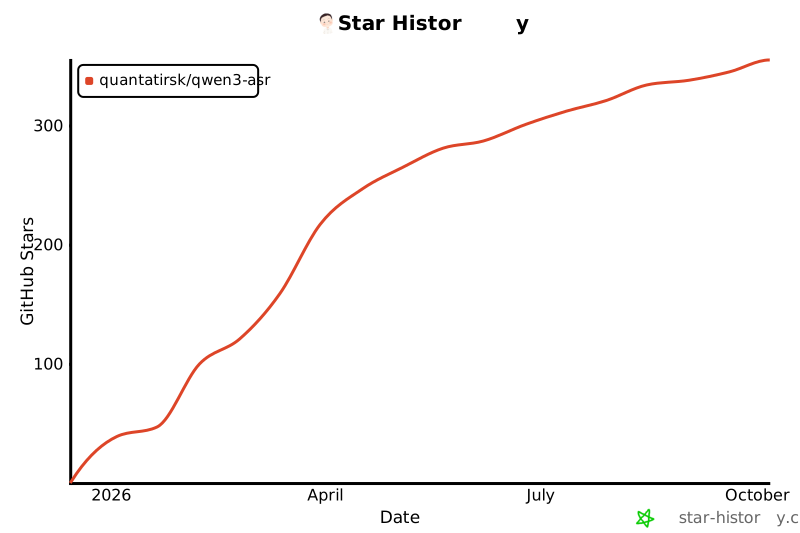](https://star-history.com/#Quantatirsk/qwen3-asr&Date)
## Contributing
Issues and Pull Requests are welcome to improve the project!